


ATE Route Check
The UK standard for assessing cycling and walking route quality across safety, comfort, and placemaking criteria.
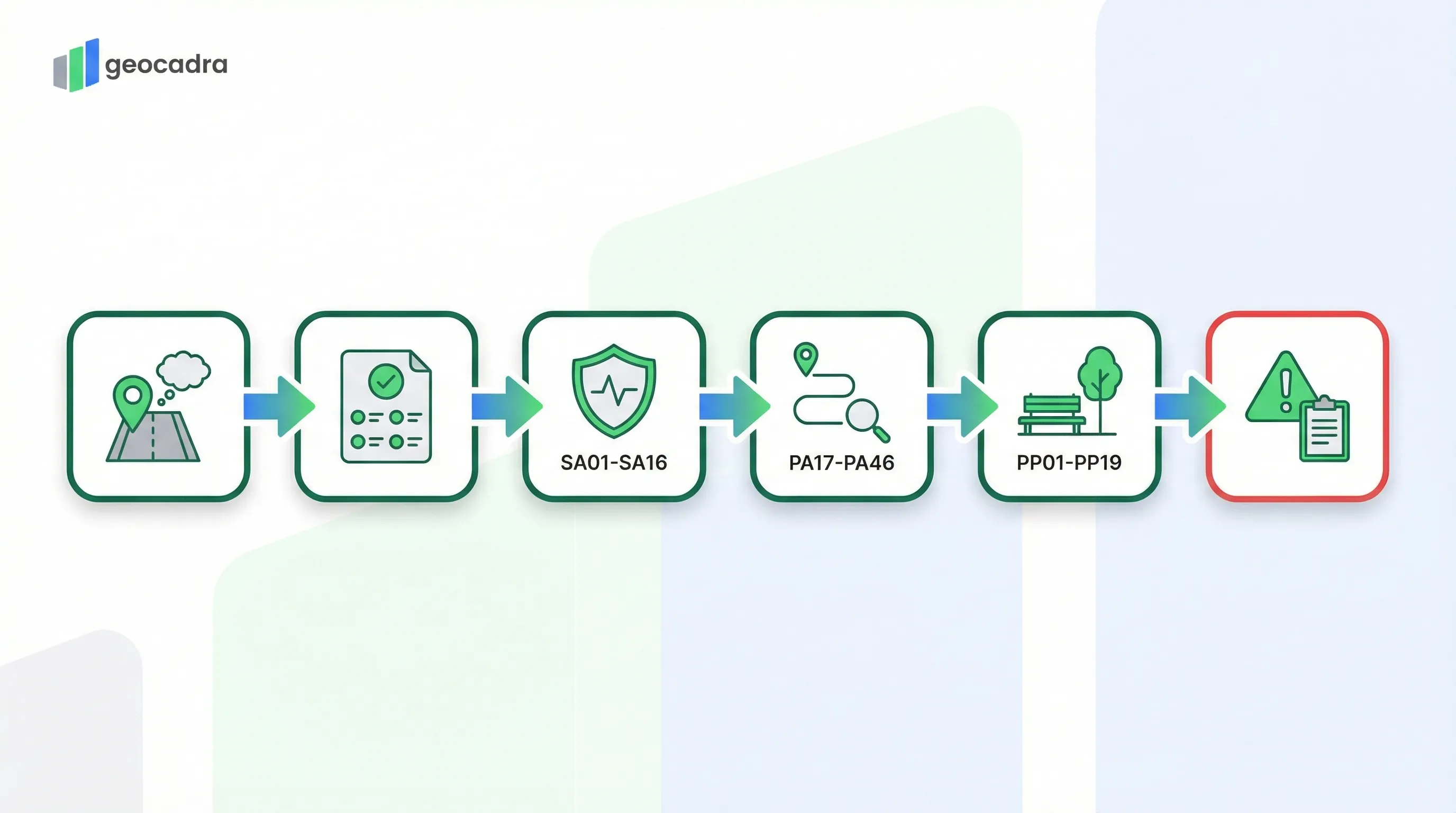
The Active Travel England (ATE) Route Check is the successor to the LTN 1/20 Cycling Level of Service (CLoS) tool. It provides a comprehensive, multi-module assessment framework for evaluating both street-based cycling routes and traffic-free paths. Inspectors score routes across Policy compliance, Safety metrics, Path quality indicators, and Placemaking criteria, producing a layered quality profile that identifies both critical hazards and incremental improvement opportunities.

What is ATE Route Check?
The ATE Route Check is the UK assessment tool published by Active Travel England for evaluating cycling and walking infrastructure quality. It uses a multi-module structure covering Policy compliance (pass/fail), Safety metrics (0/1/2/Critical), Path quality indicators (0/1/2), and Placemaking criteria (0/1/2) to produce a comprehensive route quality profile aligned with LTN 1/20 design principles.
- Full Name
- Active Travel England Route Check Tool
- Issuing Body
- Active Travel England (Department for Transport)
- Current Revision
- ATE Route Check (February 2024)
SCORING SYSTEM
How the ATE Route Check Scores Routes
The ATE Route Check uses a layered scoring approach where each module applies its own rating methodology.
Unlike single-score assessment tools, the ATE Route Check does not collapse all findings into one number. Instead, it produces separate outputs for each module, giving scheme designers and funding reviewers a detailed picture of where a route succeeds and where it falls short. The assessment begins with a Policy Check that acts as a gateway: six high-level principles must all pass before the detailed scoring has practical value.
The Policy Check evaluates six fundamental principles drawn from LTN 1/20. These include cyclist separation from motor traffic, barrier-free access, directness of routing, surface suitability for all users, adequate lighting, and network connectivity. Each principle is assessed as either compliant (Yes) or non-compliant (No). A failure on any policy principle does not prevent the rest of the assessment from being completed, but it flags a fundamental design conflict that must be resolved.
After the Policy Check, the Safety, Path, and Placemaking modules each use tiered scoring. Safety metrics use a four-level scale from 2 (Green, high service) through 1 (Amber, basic service) and 0 (Red, poor service) down to C (Critical Issue, an unsafe condition that constitutes a showstopper). Path and Placemaking metrics use a three-level scale: 2 (Green, high quality), 1 (Amber, medium quality), and 0 (Red, low quality). Every metric also allows an N/A designation when a feature is not present or not relevant to the route section being assessed.
| Principle | Requirement | Assessment |
|---|---|---|
| PO01: Cyclist Separation | Cyclists are physically separated from motor traffic where speeds or volumes require it | Yes (Compliant) / No (Conflict) |
| PO02: Barrier Free | The route is accessible without barriers, gates, or restrictive features that exclude users | Yes (Compliant) / No (Conflict) |
| PO03: Directness | The route follows a direct desire line without unnecessary detours or diversions | Yes (Compliant) / No (Conflict) |
| PO04: Surface Suitability | Surfaces are suitable for all legitimate users including wheelchair users and cargo bikes | Yes (Compliant) / No (Conflict) |
| PO05: Lighting | Adequate lighting is provided throughout the route for personal safety and visibility | Yes (Compliant) / No (Conflict) |
| PO06: Network Connectivity | The route connects meaningfully to the wider cycling and walking network | Yes (Compliant) / No (Conflict) |
All six policy principles must be compliant for a route to meet fundamental LTN 1/20 requirements. Non-compliance requires a mandatory comment explaining the conflict.
The official ATE Route Check user manual is published by Active Travel England and defines the complete assessment methodology for cycling and walking infrastructure in England.
SAFETY METRICS
Safety Critical Checks (SA01-SA16)
The Safety Check identifies conditions that present immediate hazards to cyclists, pedestrians, and other users.
The ATE Route Check defines 16 safety metrics (SA01 through SA16) that target specific hazard categories along the route. These are the most consequential part of the assessment because a Critical score on any single safety metric constitutes a showstopper that must be resolved before the scheme can be considered acceptable. The assessment applies the "Rule of Worst" principle: if 90% of a route section has adequate lane widths but one pinch point narrows to a dangerous dimension, the entire section receives the score for the worst condition found.
Key safety metrics include SA01 (Side Roads and Priority Junctions), which is scored Critical if more than 2,500 vehicles per day cut across the cycling flow without proper priority treatment. SA03 (Lane Widths) triggers a Critical score when cyclists are mixed in general traffic lanes between 3.25 metres and 3.9 metres wide, a dimension that encourages dangerous overtaking within the lane. SA08 (Motor Traffic Speed) receives a Critical rating when 85th-percentile speeds exceed 30 mph in mixed-traffic conditions without physical separation. SA11 (Footway Widths) is marked Critical when usable pedestrian width falls below 1.5 metres.
Additional safety metrics cover roundabouts and signal junctions (SA02), trip hazards with vertical upstands exceeding 13 millimetres (SA04), kerbside loading and parking conflicts (SA05), provision and standard of crossings (SA06, SA07), motor traffic volume exceeding 1,000 vehicles per hour in mixed traffic (SA09), pedestrian crossing speeds (SA10), tram line proximity (SA12), rail and tram crossing angles below 45 degrees (SA13), cycling surface defects such as potholes and ironwork (SA14), walking surface defects (SA15), and guard railing that reduces effective widths below minimums (SA16).
| Score | Label | Description |
|---|---|---|
| 2 | Green (High Service) | Fully compliant with LTN 1/20 and Inclusive Mobility. No safety risks present. |
| 1 | Amber (Basic Service) | Safe but not exemplary. Minor deviations from best practice with no direct conflict. |
| 0 | Red (Poor Service) | Uncomfortable or inconvenient conditions, but not immediately dangerous enough to trigger Critical. |
| C | Critical Issue | Severe safety hazard or condition that excludes disabled users. Must be resolved. |
| N/A | Not Applicable | Feature is not present or not relevant to this route section. |
Any single Critical score on a safety metric constitutes a showstopper for the route section.
The ATE Route Check builds on the LTN 1/20 CLoS assessment tool, expanding it with dedicated Path quality and Placemaking modules.
Try this ATE Route Check form in Geocadra
We have a pre-built ATE Route Check inspection template ready to go. Sign up and start your first condition assessment today.
Free 14-day trial. No credit card required.
PATH & PLACEMAKING
Path Quality and Placemaking Metrics
Beyond safety, the ATE Route Check measures the quality of the path infrastructure itself and the surrounding environment.
The Path Check comprises 30 metrics (PA17 through PA46) organized across five design principle categories: Accessibility, Comfort, Directness, Attractiveness, and Cohesion. Each metric is scored on a three-level scale: 2 (Green, high quality meeting or exceeding desirable minimum standards), 1 (Amber, meeting absolute minimum standards but falling short of desirable), and 0 (Red, failing to meet minimum standards or non-existent). This module provides the granular detail that separates a merely safe route from one that people actually want to use.
Accessibility metrics (PA17 to PA21) assess barriers, steps, gradients, tactile information, and the ability to turn around, ensuring the route works for wheelchair users, mobility scooters, and adapted cycles. Comfort metrics (PA22 to PA32) evaluate shared-use widths, surface conditions for walking, cycling, and horse riding, crossing suitability, access point quality, and drainage. In the form, inspectors select scores for metrics like PA22 (Width for Shared Use) and PA26 (Surface Condition) from standardized dropdown options, ensuring consistent data capture across different assessors and route sections.
The Placemaking Check (PP01 through PP19) evaluates the social and environmental value of the route surroundings. These 19 metrics are grouped into Social Activity (engagement for children, social spaces, points of interest), Personal Security (surveillance, forward visibility, visibility of others), Character (maintenance, material consistency, visual interest, support features), and Environment (trees, planting, fauna features, sustainable materials, pollution exposure, and quality of connections). PP19 (Quality of Connections) specifically assesses how well the route integrates with surrounding destinations and transport nodes.
The combination of Path and Placemaking scores gives scheme designers a complete picture: a route that scores well on safety and path quality but poorly on placemaking may be technically functional but fail to attract users. Conversely, a beautifully landscaped route with poor surface drainage or inadequate widths will receive low Path scores regardless of its environmental merits.
The accessibility metrics (PA17-PA21) relate directly to requirements in the DIN 18040 accessibility standards and the UK Inclusive Mobility guidance for dimensional thresholds. For more inspection standards, see our standards directory.
CRITICAL ISSUES
The Critical Issues Log
When any safety metric receives a Critical score, the specific hazard location must be documented.
The Critical Issues Log is a repeatable sub-form that captures detailed evidence for every safety hazard identified during the route assessment. When an inspector scores any SA metric as "C" (Critical), they must record the exact location of the hazard, either by chainage marker, GPS coordinate, or reference to a nearby landmark. Each critical issue entry requires the source metric (which SA metric triggered it), a detailed description of the observed hazard, and photographic evidence. This documentation serves multiple purposes: it provides scheme designers with actionable data for remediation, it creates an evidence trail for funding decisions, and it enables follow-up inspections to verify that hazards have been resolved.
The log accepts multiple entries per route section because a single section may contain several distinct critical hazards. For example, a 500-metre route section might have both a lane width pinch point (SA03 Critical) at one location and an uncontrolled crossing over a busy road (SA06 Critical) at another. Each hazard gets its own log entry with independent location, description, and photo evidence. Inspectors can also log hazards from the "Other Hazard" category for safety concerns that do not map neatly to one of the standard SA metrics but still warrant documentation.
For an example of a completed ATE Route Check with identified critical issues, see this published route assessment by Harrogate Cycle Action.
DIGITAL WORKFLOW
Digitize ATE Route Checks with Geocadra
Traditional ATE Route Check assessments rely on spreadsheet-based tools and separate photo management. Geocadra replaces this with a unified digital workflow.
Structured multi-module forms
Pre-built form templates mirror the ATE Route Check structure exactly: Scheme Context, Policy Check, Safety Metrics, Path Quality, Placemaking, and Critical Issues Log. Inspectors work through each module in sequence with validated dropdown selections for every metric.
Geolocated critical issue capture
Every Critical Issue log entry is automatically pinned to the map with GPS coordinates and linked to photo evidence. Reviewers see exactly where each hazard sits along the route, not just a description in a spreadsheet row.
Contextual scoring logic
The form adapts based on the route type selection (Street-Based vs. Traffic-Free Path) and contextual setting (Urban Centre, Suburban, Rural, etc.), presenting only the metrics relevant to the assessment scenario.
Multi-route portfolio comparison
Compare safety, path quality, and placemaking scores across multiple route sections in a single dashboard. Identify which routes need the most urgent attention and track improvement over time as remedial works are completed.
QUESTIONS
Frequently Asked Questions
What is the ATE Route Check?
The ATE Route Check is a comprehensive assessment tool published by Active Travel England for evaluating cycling and walking infrastructure quality. It uses a multi-module structure covering Policy compliance, Safety metrics, Path quality, and Placemaking criteria to assess routes against LTN 1/20 design principles.
What is the difference between the ATE Route Check and CLoS?
The ATE Route Check is the successor to the Cycling Level of Service (CLoS) tool from LTN 1/20 Appendix A. It expands the assessment scope significantly with dedicated Placemaking metrics, a separate Path Check module for traffic-free routes, and a structured Critical Issues Log for hazard documentation.
What triggers a Critical Issue in the ATE Route Check?
A Critical Issue is triggered when a safety metric (SA01 through SA16) identifies a severe hazard. Examples include lane widths between 3.25 and 3.9 metres in mixed traffic, 85th-percentile speeds above 30 mph without separation, or footway widths below 1.5 metres.
Is the ATE Route Check mandatory for funding?
Active Travel England requires schemes seeking government funding to demonstrate compliance with LTN 1/20 standards. The ATE Route Check is the primary tool used to assess this compliance. Schemes with unresolved Critical Issues or Policy failures are unlikely to receive funding approval.
What is the Rule of Worst in the ATE Route Check?
The Rule of Worst means that the score for a safety metric reflects the worst condition found anywhere along the route section, not the average. If 90% of a path has adequate width but one pinch point is critically narrow, the entire section receives the Critical score.
Can the ATE Route Check be used for existing routes?
Yes. The ATE Route Check can be applied both to proposed new designs as a desktop review and to existing built infrastructure as a field audit. When used on existing routes, it identifies specific deficiencies and critical hazards that need targeted remediation.
How does Geocadra support ATE Route Check assessments?
Geocadra provides structured digital forms matching the four ATE Route Check modules, GPS-linked critical issue logging with timestamped photo evidence, contextual metric filtering based on route type and setting, and portfolio-level comparison of multiple route sections across an entire network in a single dashboard.
In practice
See how the round runs in Geocadra
The solution page shows this inspection regime on real open data: the import, the form, the round, the record per asset and the export.
Main and routine inspections of bridges, walls, roads and signs on a map, with every inspection appended to the structureOpen the solution page: Bridges, Roads & StructuresTRY IT FREE
Digitize your ATE Route Check inspections
Replace paper forms and spreadsheets with structured digital inspections, built for standards like ATE Route Check.
No credit card requiredFree trial included