
Playground inspection software for play areas, goals and outdoor gyms
Playground inspection software that keeps one record per item of equipment. The routine visual, operational and annual main inspections sit on the same map. Each defect has its risk rating, its photos and its action.
- One record per item of equipment
- Routine, operational and annual inspections
- Excel, GIS files and a PDF report
A town's play equipment, inspected item by item every year
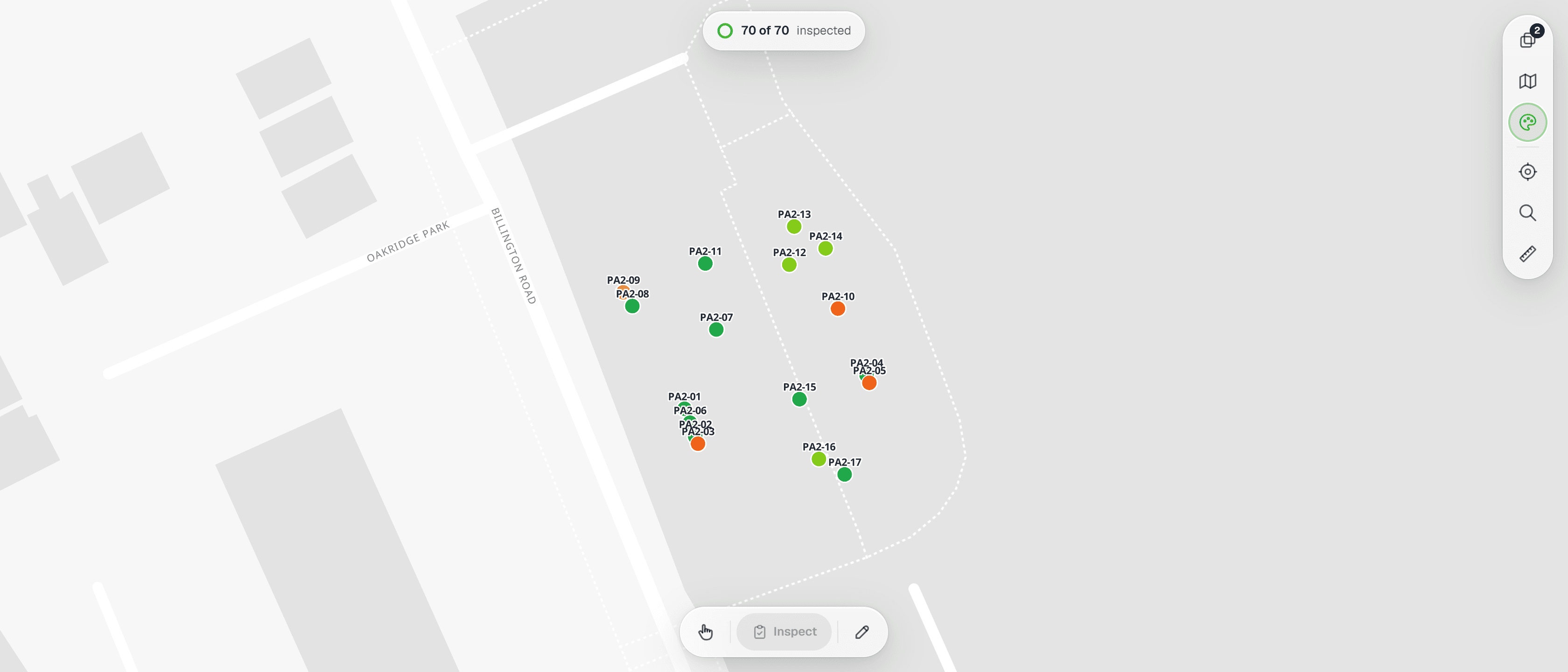
The screenshots on this page are not mock-ups. They come from the Geocadra demo workspace, where 70 items of play equipment in seven public play areas of Leighton Buzzard, England, were taken from OpenStreetMap and given an annual main inspection in 2025 and in 2026 with one inspection form. Positions and equipment types are the real OpenStreetMap data; the council, site names, manufacturers, defects, risk ratings, photos and inspectors are demo data.
- Dataset
- Play equipment in seven play areas, Leighton Buzzard
- Publisher
- OpenStreetMap contributors
- Licence
- Open Database Licence (ODbL) 1.0
- Coordinate system
- EPSG:4326 (WGS 84)
- Extract
- 70 items of equipment, 19 KB GeoJSON
- 01
Import the equipment
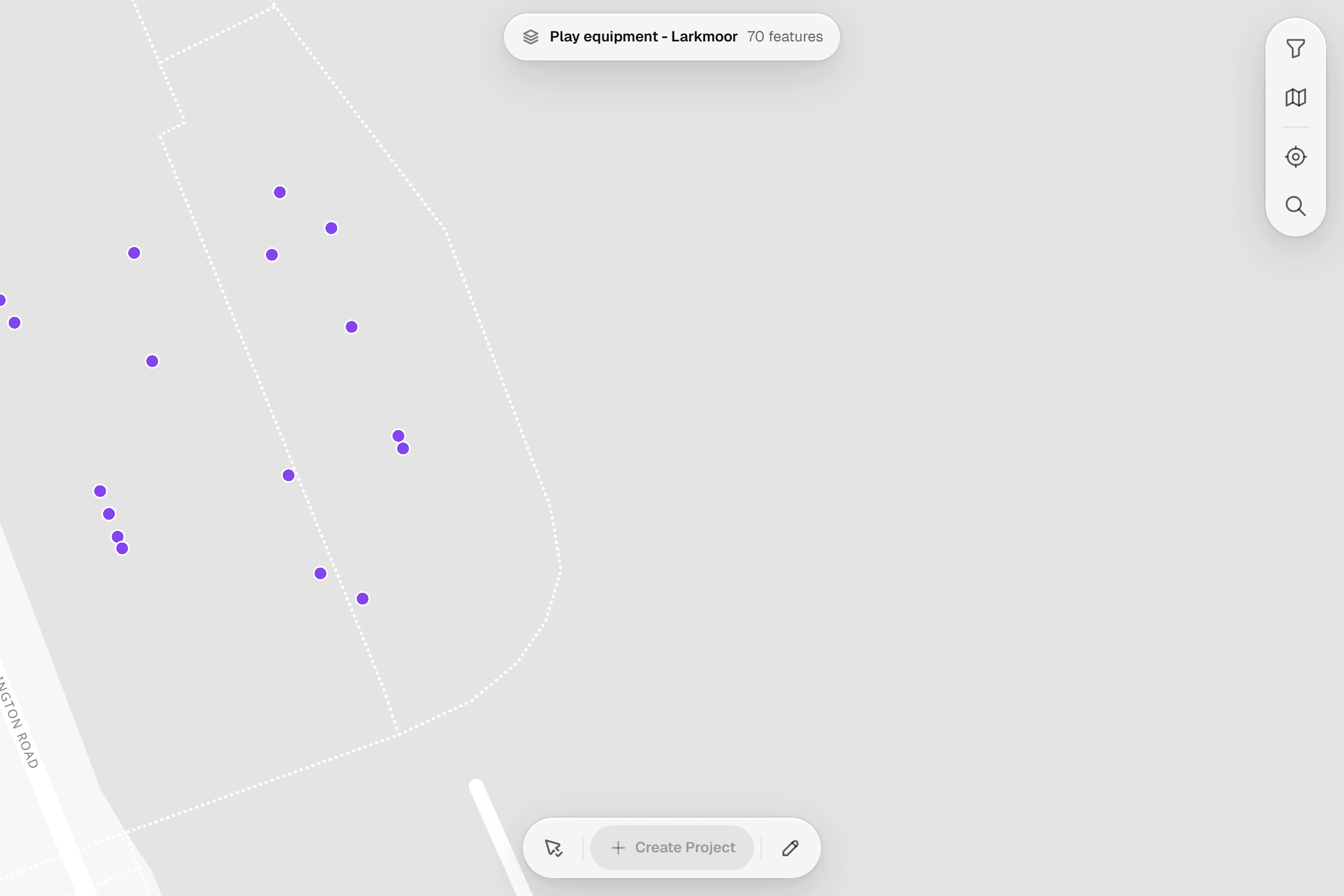
The file is in WGS 84: 70 items of play equipment, with ID, play area and type.
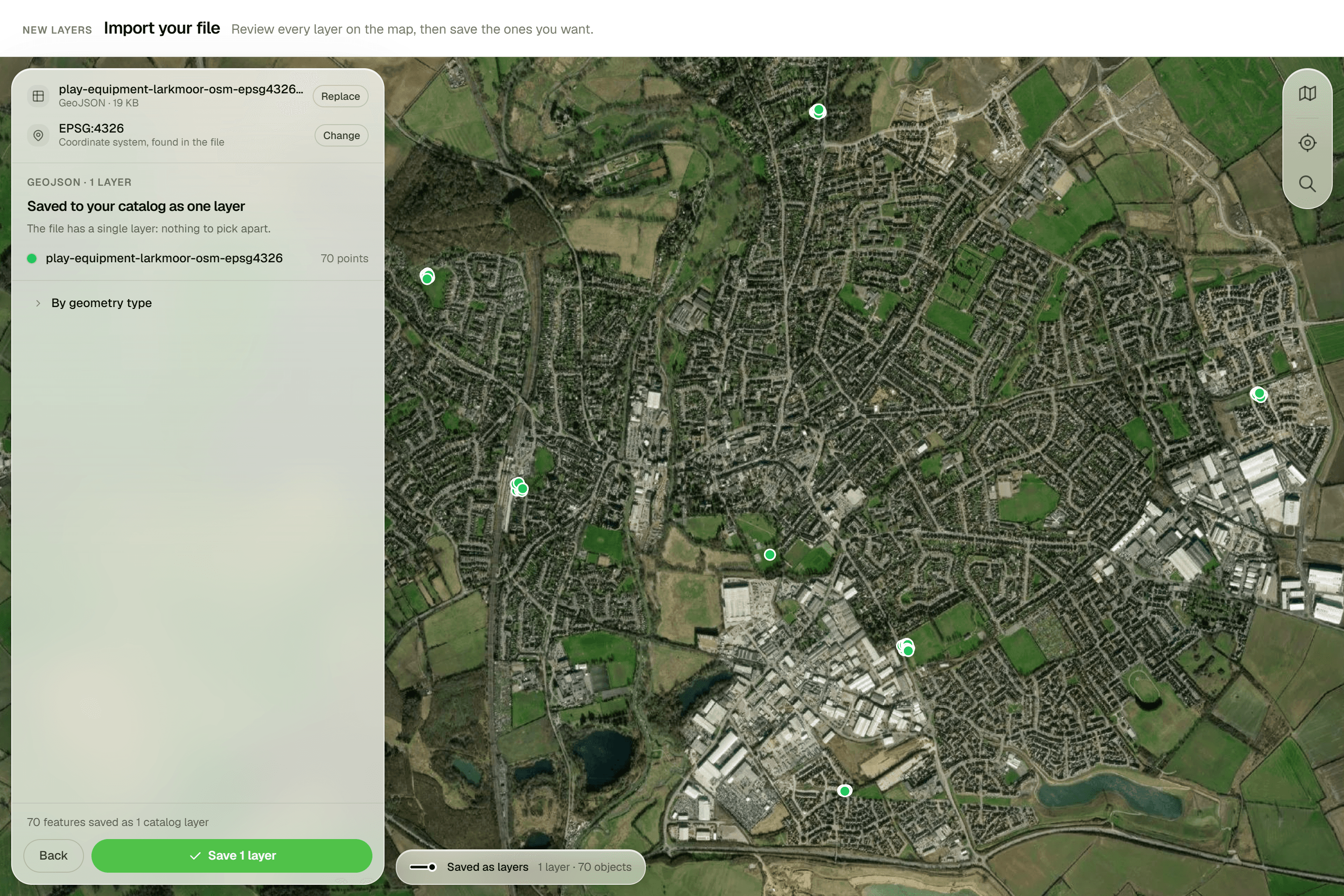
The file is in WGS 84. The importer reads it, places the 70 items of equipment on the map and keeps the equipment ID, play area, equipment type and description as attributes. Save as one layer.
- 02
Set up the inspection form
One form per item, following BS EN 1176-7: surfacing, then each defect with its risk and action.
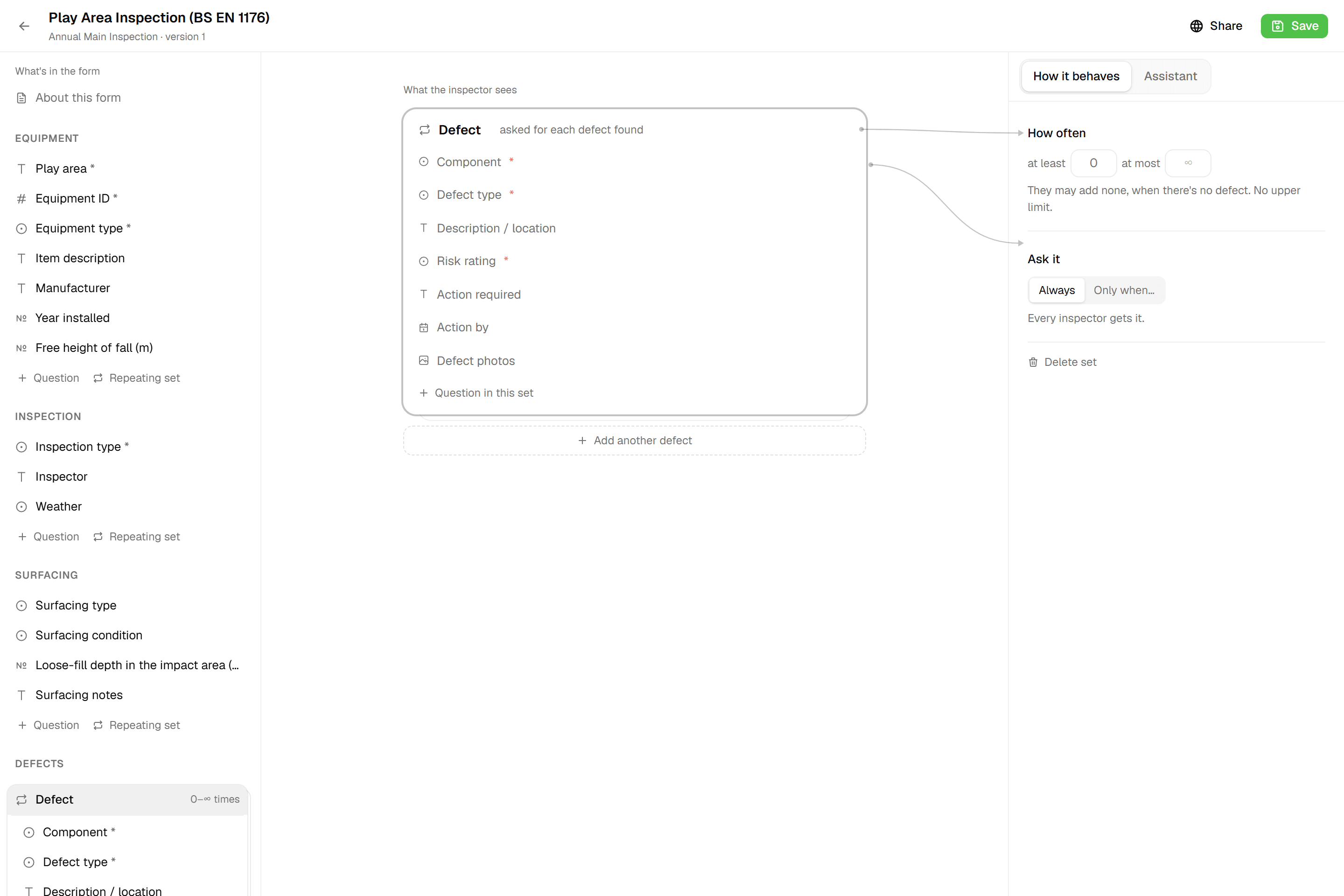
One form per item of equipment: the item, the inspection type, the impact-absorbing surfacing with its loose-fill depth, then one entry per defect with component, defect type, risk rating, action required, action-by date and photos, and the overall condition, highest risk and usability. Here it follows the European playground standard EN 1176.
- 03
Run the round on the play areas
The 2026 annual main inspection covers all 70 items; the map colours them by condition.
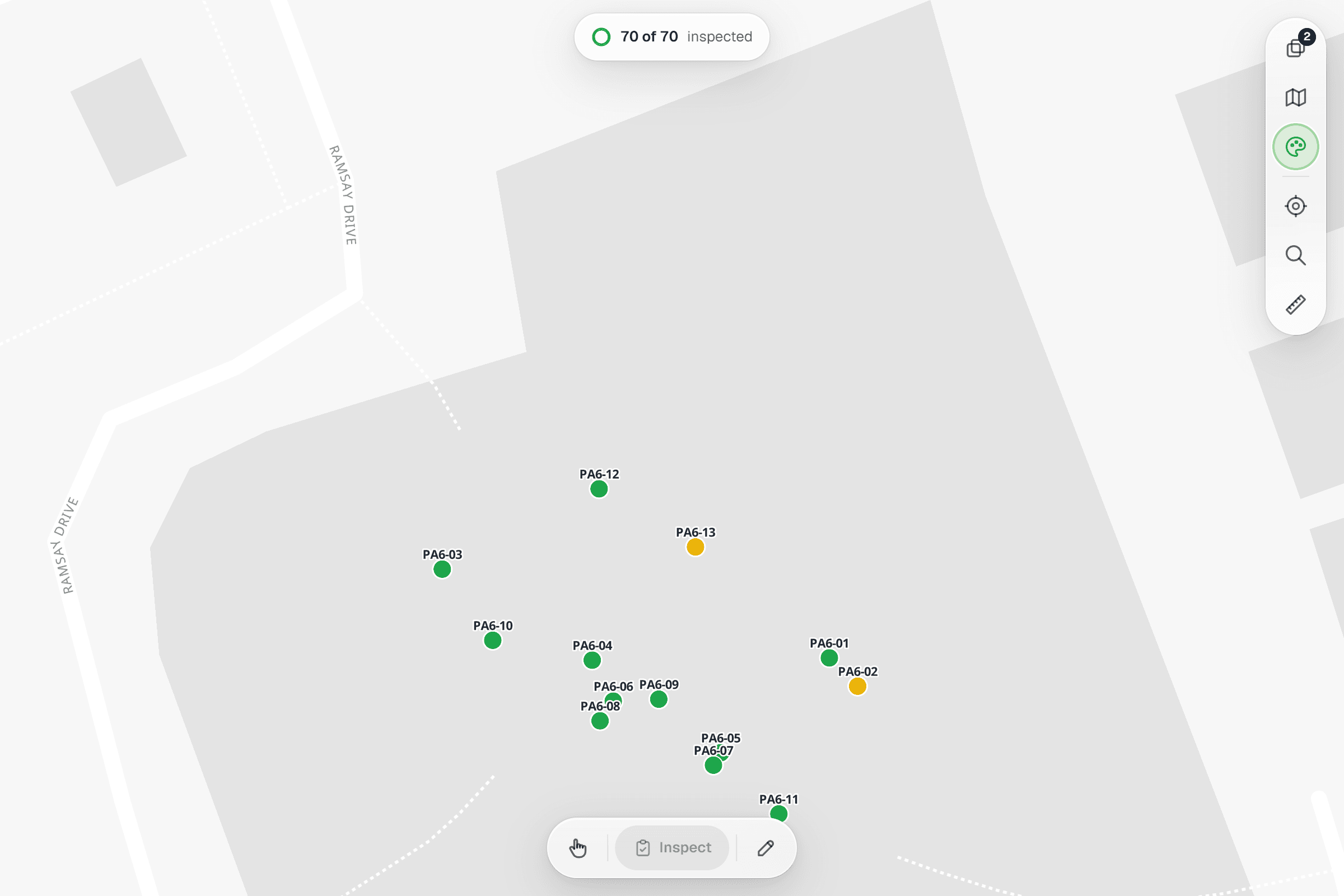
The 2026 annual main inspection covers all 70 items and is done in the screenshot: the map colours each item at one play area by its overall condition, and the status panel counts every item in the round.
- 04
Inspect at the equipment
Tap the item: equipment and surfacing, then one defect after another with its risk.
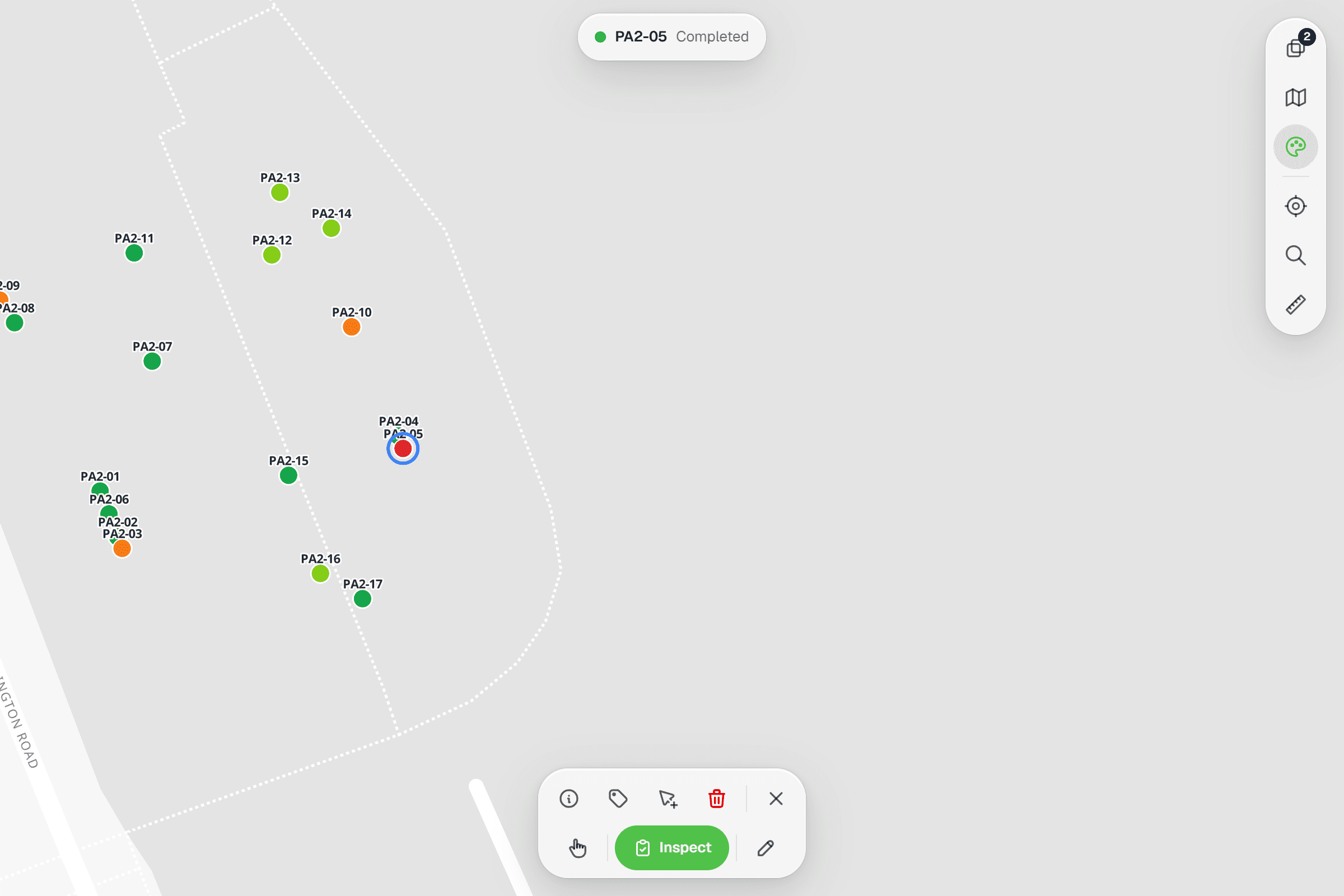
Tap the item, open the form: equipment, inspection and surfacing, then one defect after another with component, defect type, description, risk rating, the action and its date, and photos, then the assessment.
- 05
Every inspection stays on the item
The 2026 inspection is the current version; 2025's shows how many fields differ.
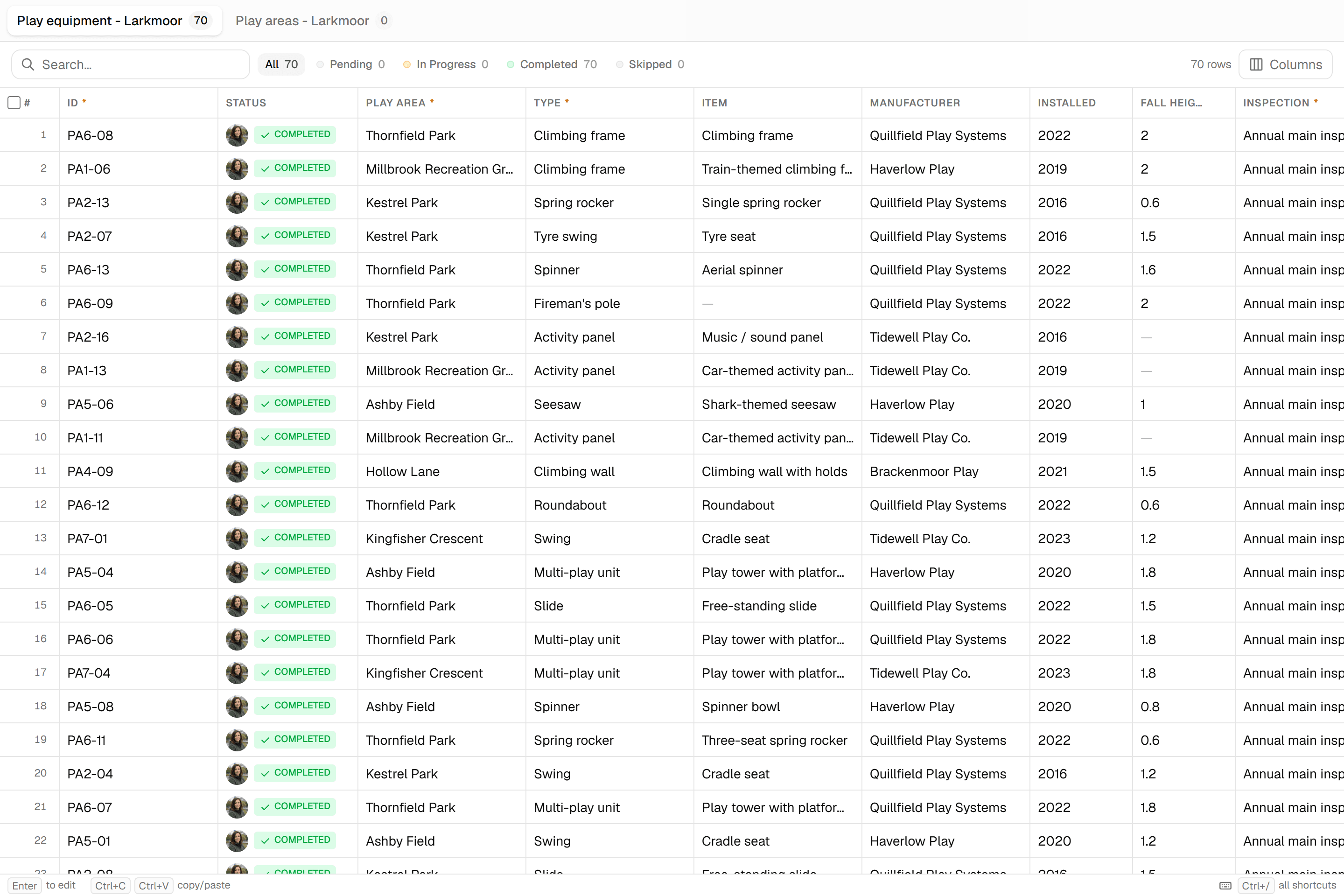
The features grid shows the version history of an item: the 2026 inspection as the current version and the 2025 inspection with the number of fields that differ. Any version can be staged for restore and reviewed before it is applied.
- 06
Hand it over
Excel for the inspection log, GeoJSON for the GIS, a PDF report for the insurer.
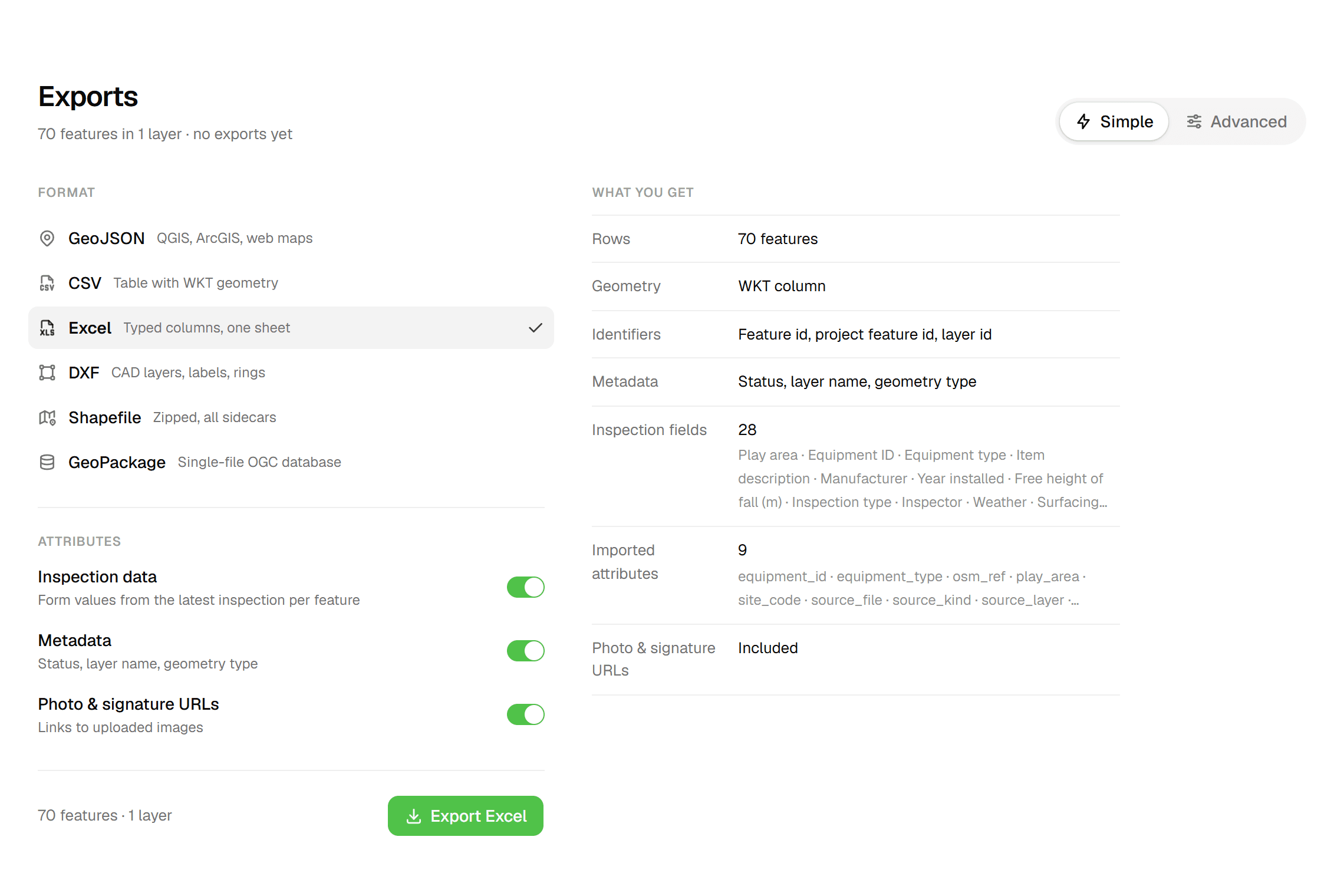
Excel with one typed column per form field for the inspection log, GeoJSON or Shapefile for the GIS, a PDF report for the client. The export takes the latest inspection of each item; the history stays on the item in Geocadra.
The file is in WGS 84. The importer reads it, places the 70 items of equipment on the map and keeps the equipment ID, play area, equipment type and description as attributes. Save as one layer.
Who buys playground inspection software: the inspection firm and the operator
In the UK the inspector who does the annual inspection brings the software that writes the report. The operator's system holds the register, the routine inspections and the repairs. Geocadra is play area inspection software for the firm that inspects for many clients. It also fits a town or parish council with a handful of sites.
Inspection firms and independent inspectors
Each client is an organization in your workspace, with its own play areas, items and logo; the Starter plan holds three. The annual round is a project on the client's layer, and the findings, the photos and the report draft come out of that round. Your client's officer reads them as a viewer, on a free viewer place.
Councils with their own inspectors
The register comes in from the GIS and stays yours. Your own staff run the routine and operational rounds. The external inspector is invited into the annual project as an editor, on one of your seats, and records on the same items. Next year's inspector starts from this year's record, whoever they work for.
Town and parish councils
With one to ten sites there is often no GIS. Import a CSV with coordinates, or place each item on the aerial photo once. When the insurer or a councillor asks, the clerk has every check, the annual findings and what was done about them in one place.
Housing providers, schools and trusts
The same pattern on an estate or a school site: the items are a layer and each programmed inspection is a project on it. The contractor who inspects works inside your project instead of sending a PDF afterwards.
Who inspects what in a play area
BS EN 1176-7 works with inspection types of rising depth. Each is a round over the same items, done by different people, and each leaves its own record.
| Inspection | How often | Who | What it looks at |
|---|---|---|---|
| Routine visual | Weekly or more often; RoSPA calls weekly the minimum | The operator's own staff or a contractor | Cleanliness, broken glass, vandalism, obvious damage, surfacing by eye |
| Operational | Monthly to quarterly; the council tenders we read buy three or four a year | Trained staff or a contracted inspector | Wear on chains and bearings, ground clearances, exposed foundations, sharp edges, missing parts |
| Annual main | Once a year | A competent inspector, in the UK usually one on the RPII register and not connected with the operator | The overall safety of equipment, foundations and surfaces; each defect with its risk and a recommended action |
| Post-installation | Before new or altered equipment opens | A competent inspector | The new or altered installation, before it opens to the public |
The RPII's inspection scope reads the inspection part of the standard as guidance in the UK: the operator decides the intervals. The US CPSC handbook names no fixed interval. An annual inspection does not usually measure loose-fill depth unless that was agreed, so the operator's own checks matter. The UK form in the marketplace records routine visual, operational and annual main inspections, item by item; add a post-installation type to your copy if you carry them out.
From the register to the defect: a round in Geocadra
A play area is checked by the operator's staff every week, in more depth every few months and by an inspector once a year. In Geocadra the items of equipment are one layer on the map and every one of those rounds is a project on that layer. An inspection belongs to the item it was made on.
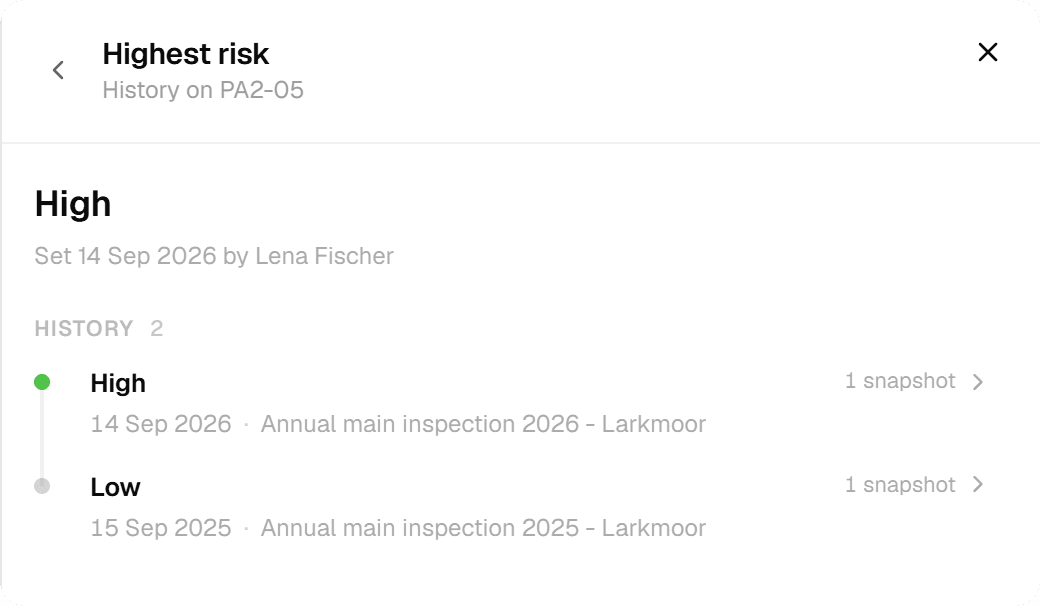
What the product does today, on one item from the demo workspace: its highest risk in two annual inspections.
One defect, one entry
On the item's sheet a defect is a repeating entry: component, defect type, risk rating, action required, action-by date and photos. Three defects on a multi-play unit are three entries with their own photos; an item without defects has none.
The register is a layer you import once
Load the items from the GIS as GeoJSON, Shapefile or GeoPackage, or from a CSV with coordinates. The importer places them on the map and keeps every attribute the file carried. Without a file, place each item on the aerial photo with the crosshair.
Each round is a project on that layer
The routine, operational and annual main inspections each have their own project and their own people. The project's overview counts the items done and the items left; the map shows which.
Last year's finding is on the item
Open a swing and read its highest risk in 2025 beside 2026, with the name of whoever recorded each. An inspection is added, never edited in place; a correction made in the office is marked as one.
What councils ask of a playground inspection report
The council tenders we read for annual inspections ask for the same handful of things. This is where each of them comes from in Geocadra.
The defects as a spreadsheet
The Excel export has one row per item of the round, a typed column per form field and links to the photos. Filter it to the items with defects. A table that lists each defect on its own row is a block of the report.
A photograph of each defect
Photos are taken inside the defect entry, up to five per photo field, so each one belongs to its defect on its item. Nobody matches file names to notes afterwards.
High risks reported before leaving site
The item's usability is recorded on the spot: open, open with a restriction, or closed, with the action taken on site. Geocadra sends no alert: the inspector still rings the client's officer, who finds the finding on the item when they open the project.
A written report of the inspection
The report is built from the round: key figures, a table of findings, the photos and a map. An assistant drafts the text from the inspection data; you read it, change it and finalise the PDF. Report templates are set up per workspace together with us.
One system for assets, inspections and repairs
The register and the inspections are one record. A repair is recorded as a new inspection of the item, or in a field you add to your form.
Records that are never overwritten
Every inspection stays readable on its item in the app. The export carries each item with its latest inspection, as Excel, CSV, GeoJSON, Shapefile or GeoPackage.
Four playground rounds, step by step
Each of these rounds starts from a form in the Geocadra marketplace. Copy the form and change its option lists to your own words.
Routine visual inspection by the operator's staff
Someone walks the play areas every week and looks for anything obvious on each item. Most items have nothing to report, and the round should not take longer because it is recorded. The UK form is per item: litter, glass and gates go in the comments of one item, or on a site layer with a short form of your own.
- 1Create the week's project on the play equipment layer with the play area form and add the colleagues who walk the sites.
- 2At a play area, select the items that are fine and submit the same answers for all of them in one go.
- 3Open an item with a problem on its own: add the defect with its risk, the action taken on site and a photo, and set its usability.
- 4The overview counts the items done and the map shows which. A closed item is on the record once it is submitted.
Annual main inspection by an RPII inspector
Once a year every item is inspected in depth, usually by an external inspector. The inspector works in the operator's project, or in their own workspace with the operator as a client organization.
- 1Operator: create the year's project on the same layer and invite the inspector. Inspection firm: import the client's register into a client organization of your own.
- 2Fill one sheet per item: equipment, surfacing, then one entry per defect with component, defect type, risk rating, action and date.
- 3Set an item that is not safe to closed, with the action taken on site, and ring the client before leaving.
- 4Export the round to Excel and filter it to the items with defects. Prepare the report from the round: the draft is written from the data and finalised as a PDF by the inspector.
Outdoor gyms and goals on the same sites
The inspector who checks the play area usually checks the outdoor gym and the goals beside it. Each is its own layer with its own form, in the same project.
- 1Add the fitness equipment as a second layer with the outdoor fitness form, built around EN 16630: instruction label, structure, moving parts, surface, risk and action per item.
- 2Add the goals as a third layer with the goal form: type and size, the stability and strength tests, net hooks and sockets.
- 3Run all three layers in one project; the sheet that opens is the form of the layer the item belongs to.
- 4Fences, gates and signs can be layers too, so the whole site is inspected in one walk.
Playground safety inspections in the United States
US practice follows the CPSC handbook and ASTM F1487. The US form records a whole playground at a time, with each piece of equipment as an entry on it.
- 1Import the playgrounds as points or polygons and create the project with the playground safety inspection form.
- 2Record the site first: accessible route, age signs, drainage and site hazards.
- 3Add one entry per piece of equipment: fall height, use zone, surfacing and the lowest loose-fill depth; the form works out the shortfall.
- 4Give each site hazard a priority from 1 to 4 and an action; a photo is asked for at the two highest priorities.
Standards behind the playground forms
Each marketplace form is built around the way its standard structures an inspection. A form holds the inspector's findings.
BS EN 1176-7: the type of inspection
The UK play area form records every inspection as routine visual, operational or annual main, per item, with the inspector and the weather.
A risk rating on every defect
Five levels from very low to very high in the UK form. The option list is yours to change: use the bands your reports already use.
Impact-absorbing surfacing
Surfacing type and condition per item, and the loose-fill depth in millimetres where the surfacing is bark, rubber mulch or sand.
CPSC handbook and ASTM F1487
The US form records fall height, use zone, surfacing, entrapment and hardware per piece of equipment, and a priority from 1 to 4 per site hazard.
EN 16630 and goals
Outdoor fitness equipment has its own form with the signage and the moving parts; goals have theirs with the stability and strength tests.
Standards this page covers
Each standard below has its own page with the inspection regime, the rating system and the form on the marketplace.
Checklists and templates
The working document of a job on one page: what to check, what to record and what the report has to say.
Related inspections
The same client usually has these rounds too. Each has its own page.
Questions from inspectors and parish clerks
Does the playground inspection app work offline?
The Android app, in early access by invitation, saves an inspection without signal and sends it when the connection is back. The web app works wherever you have a connection.
Can our council clients see the findings without paying for a seat?
Yes. A client contact invited as a viewer to their organization or to one project uses a free viewer place, not a seat. They see the map, the items and their inspections, and can download exports and finished reports. A seat comes with two, four or ten free viewer places, depending on the plan.
Can we bring our existing play area register?
Yes. The import reads Shapefile, GeoPackage, GeoJSON, KML, DWG and DXF drawings and CSV files with coordinate columns. An Excel sheet has to be saved as CSV first. Every attribute in the file is kept, including your own asset numbers.
Does it score risk the way our reports do?
The UK form comes with five levels from very low to very high. The list belongs to your copy of the form, so you can replace it with the bands or scores your reports use. The form prescribes no scheme.
How do the weekly checks repeat?
A recurring round is a pattern you repeat: create next week's project on the same layer, with the same form.
How does Geocadra support inspections to BS EN 1176?
The form follows the inspection types of BS EN 1176-7 and holds what the inspector found for each item, with photos and dates. Whether an item conforms is the inspector's judgement.
Can the annual report come out in our house format?
A report template is set up per workspace together with us, with your fonts, colours and logo. The text is drafted from the inspection data by an assistant; you review it, change it and finalise the PDF. A finalised report cannot be changed; a correction is a new revision.
Does it cover games areas, skate parks and outdoor gyms?
Outdoor gyms and goals have English forms in the marketplace. The form for multi-use games areas and skate parks exists in German only today; copy it and reword it, or start from the play area form. Anything with a location can be a layer with its own form.
Where is our data stored?
Your projects, photos and files are stored in Frankfurt, Germany. AI features, such as the report draft, are processed by providers in the US.
What does it cost for a small council?
Plans are priced per seat, from €49 a month for one seat, excl. VAT, with two free viewer places. A parish council where one person records the checks needs one seat. The pricing page has the plans in full.

Run your next playground round on the map
Import the register, copy the play area form and inspect the first item today. Free for 14 days, no credit card.
No credit card requiredFree trial included